Table of Contents
.avif)


We’ve been building AI agents long enough to know that making an agent perform really well, while difficult, is only one part of the challenge enterprises need to solve. The other is making agents maintainable as you scale. That requires exercising a different set of muscles.
First, let’s be clear about what we mean by scalability. It isn’t just about interaction volume. For an AI agent, scalability is about the number, variability, and complexity of the use cases it handles. The effort to tackle a single use case well, so that every customer has the kind of experience you intend, is high. How do you ensure that you don’t have to repeat that level of effort as you expand to a second, seventh, or twentieth use case?
There’s an aphorism in software development that applies well here—good programmers build for reuse. That’s truer than ever when building agentic systems.
Commonalities in use case workflows
Consider this practical example.
Let’s say you’re working on building agents for an insurance company for the following use cases:
- Look up claim status
- File a claim
- Dispute a claim
ASAPP often starts by building out one use case to prove the value of the product. In this case, let’s say we began with the easiest use case, looking up claim status. But very quickly, our customers want to translate that success to other use cases like filing a claim or disputing one.
Here are rough flowcharts for workflows associated with these use cases. The steps these different workflows have in common are colored in purple, with the intensity of the purple reflecting the commonality of the step.
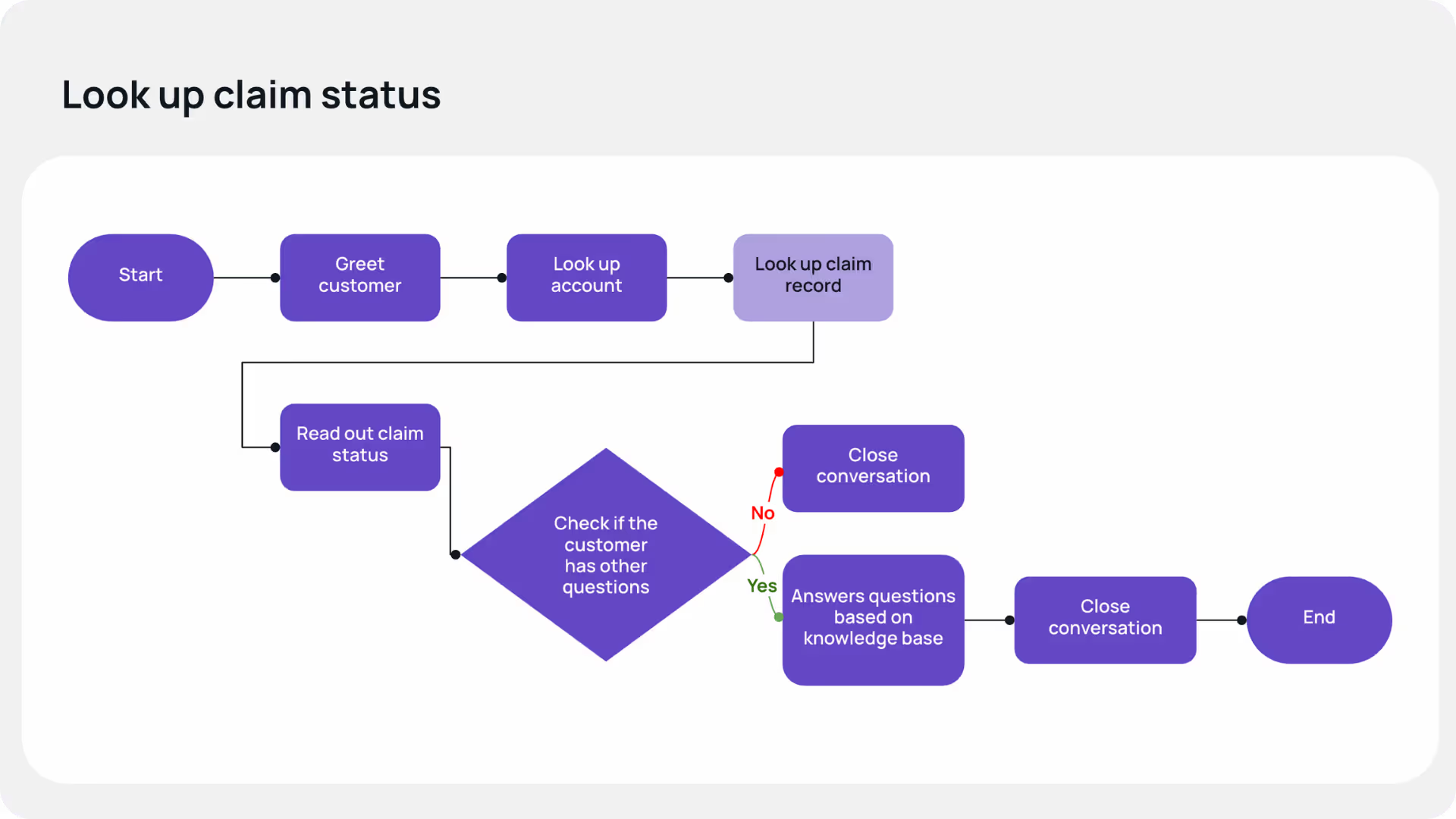

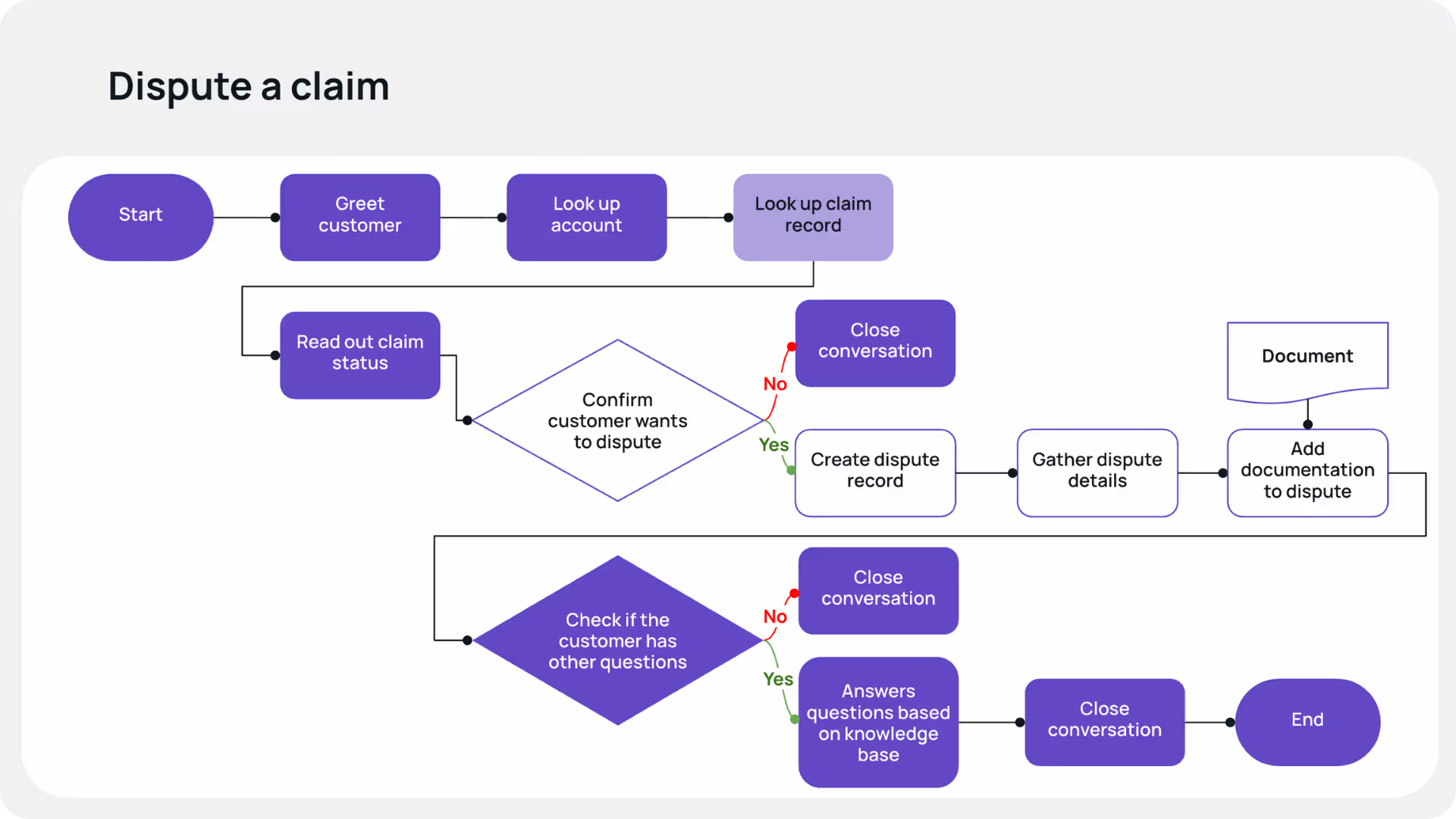
The commonalities here are not unusual. In an enterprise, many steps are repeated across different workflows. These steps often use the same tools, set of policies or business logic, and knowledge base documents, in order to be successfully executed.
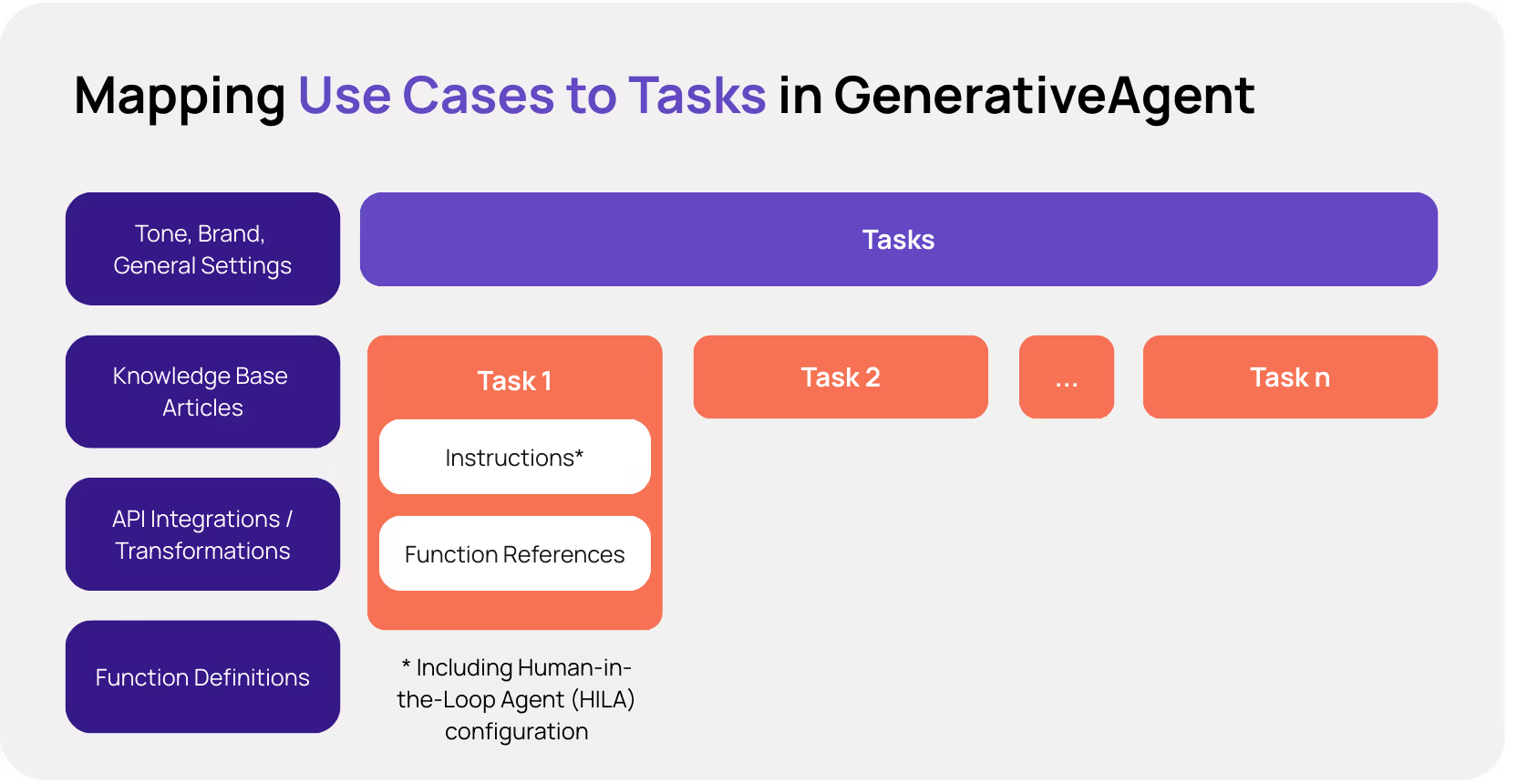
When building out use cases with GenerativeAgent®, part of ASAPP's Customer Experience Platform (CXP), each use case maps to a task, which encompasses the instructions needed to run that use case and references to functions. Task instructions detail the goal to be achieved and the steps to be executed to accomplish that goal successfully. Function references cover integrations with APIs and other agentic systems via REST/MCP, as well as internal functions to access memory, escalate to a human agent, or even just consult a human agent in the background to support GenerativeAgent’s logic. Instructions include both prompt-like natural language and more complex logic described using Jinja templating. Tasks implicitly use associated knowledge base articles to help accomplish goals. Other common settings related to tone and brand are also injected into instructions automatically.
As we build out additional use cases, we add more tasks. GenerativeAgent has a built-in task selector that chooses the right task depending on the customer’s needs, and can switch back and forth between tasks during a conversation as needed.
Creating new use cases—and a maintenance problem
For our insurance use cases, we would begin with a single task for looking up claim status. Let’s say we next had to add three more tasks for the other use cases. In the past, we would address this situation simplistically by taking the relevant fragments of task instructions from the claim status lookup task and copying them into the new use cases. While this works, it results in similar logic repeated in multiple places.
Let’s say that sometime in the future, the process for looking up an account changes. Instead of looking up the account by asking for an account number and validating account information, the new process is to connect the caller’s phone number and look up the account that way. Because we’ve repeated the same logic across multiple tasks, we would have to update the instructions in each task. It quickly becomes a maintenance nightmare.
In our first attempt to solve the maintenance problem, we used the GenerativeAgent memory capabilities to support daisy-chaining logic. We would create a top-level task to capture information (for example, look up an account, find active claims, and look up the corresponding claim records, and store these details in memory) and then shift to a more specific task (such as reading out claim status, adding documentation to a claim, or filing a dispute).
With this approach, changes could be centralized. But having logic split up between tasks required the system to transition between tasks at the right time and with perfect accuracy, which created risk.
Which is why we created bricks.
A solution at last—building with bricks
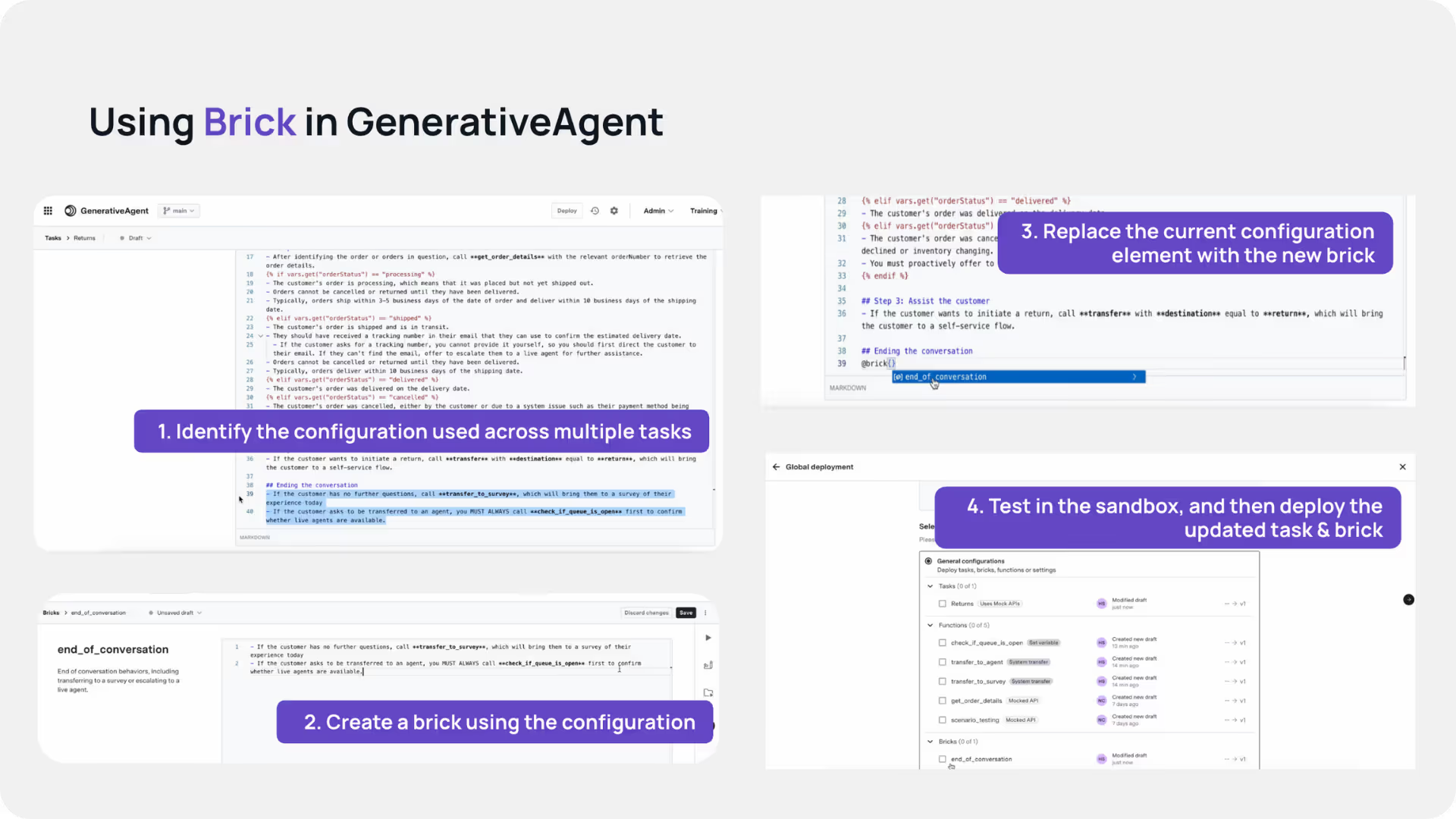
Bricks are versioned, reusable prompt fragments that can be inserted into tasks, allowing teams to share logic, tone, policies, and workflow steps across use cases without duplication.
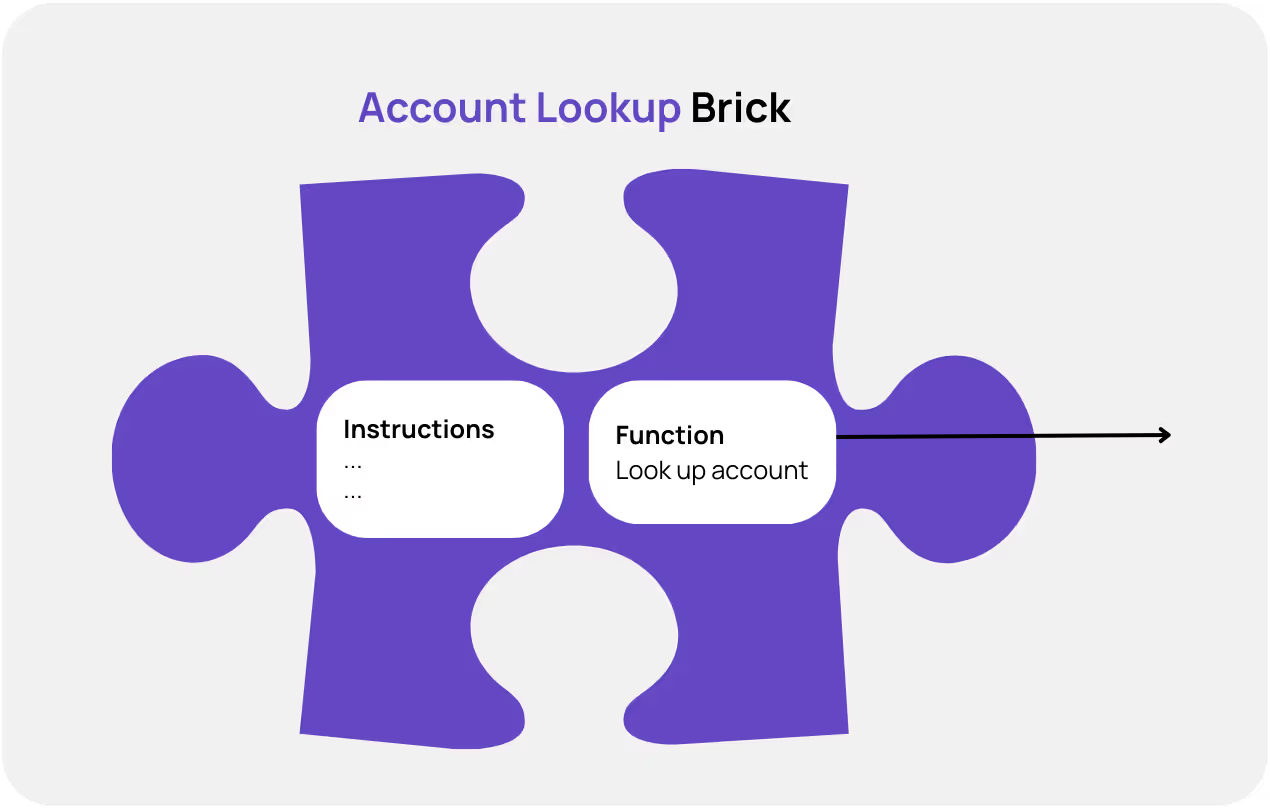
Using bricks, we could break the workflows down to create the following sets of reusable logic:
- A customer greeting brick: This would encompass the common logic needed to greet the customer, ask them about the reason they’re calling, and clarify as needed to get to a specific request.
- An account lookup brick: This would use the customer’s account number to look up their account. If the account number happened to be available in the input context (for example, if it was captured by the IVR), that would be used. If not, the brick’s logic could request the account number from the customer before it makes a function call to look up the account. It would also have logic to deal with situations where the account lookup failed (for example, verifying the account number or eventually escalating to a human agent if it was not able to perform the lookup successfully due to an API failure).
Similarly, we would create 5 additional bricks:
- Look up the latest claim record using information from an account.
- Read out claim status using information in the claim record.
- Add documentation to a claim record by asking the customer to upload a document, verifying that the upload succeeded, and then associating it with the claim record being discussed.
- Check if the customer has any additional questions and use the knowledge base to answer them.
- Close out a conversation with the customer.
These bits of logic could then be assembled within specific task instructions. GenerativeAgent allows bricks to be dropped in within such instructions so that bricks can be chained and connected in appropriate ways to fulfill the goals of the task.
One way to think about bricks in GenerativeAgent is that they are a repository of common library routines. For this set of four use cases, we would use these seven separate bricks. The task instructions would just contain the unique instructions that are specific to the use case, along with some glue logic to combine bricks in appropriate ways, resulting in over 75% of instructions being reused.
The strategic impact of building with bricks
From an engineer’s perspective, building with bricks is nothing short of…beautiful! And from a practical perspective, it brings down the cost of building and maintaining multiple use cases in significant ways.
For enterprises that use GenerativeAgent, the benefits of bricks are extensive. Shorter build time means faster time-to-value. And lower maintenance costs mean you get more consistent returns on your investment over time. As conditions change, you’ll inevitably need to update task instructions. Building with bricks ensures less configuration drift and a more consistent brand voice as you make necessary updates. It also improves governance and compliance.
But the biggest benefit is the ability to scale your AI agent and build value for your business—one brick at a time.
To learn more about the Brick functionality, visit ASAPP's Brick documentation page.
The author would like to thank Hannah Yu, Hernán Amarillo, and Guillermo Coro for contributing to this blog post.