Table of Contents



Key things to know
- Most enterprise AI automation deployments improve rapidly at launch...then plateau. The architecture that enables fast early results is the same architecture that limits long-term gains.
- ASAPP's five AI agents within its Customer Experience Platform (CXP)—Discovery, Developer, Simulation, Optimization, and Insights—are designed not just to serve adjacent functions, but to feed each other in a continuous loop.
- The result is a flywheel: each cycle produces better data, better workflows, and better outcomes than the last, automatically, without requiring your team to start over.
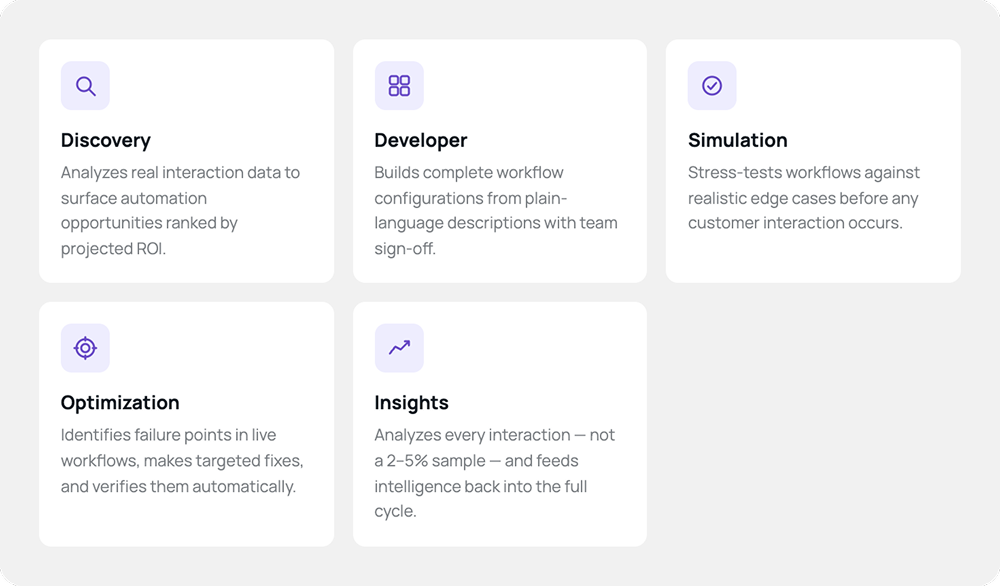
- Discovery identifies where to build. Developer builds it. Simulation validates it before launch. Optimization makes it reliable and self-correcting in production. Insights feeds everything it learns back into the next cycle.
- Enterprises running CXP in production are seeing 330% average ROI. That's not a launch-day outcome. It's what a system that compounds looks like.
The problem that comes after launch
Getting your first customer-facing AI automation live is hard. Most enterprises know this well. But there's a second problem that gets less attention: what happens after.
Most AI automation deployments follow a familiar arc. You pick a use case, build the workflow, test it, and launch. Performance is reasonable—maybe better than expected. Leadership is pleased. You move on to the next use case.
Six months later, you look at the metrics. Containment is roughly where it was at launch. CSAT hasn't moved meaningfully. A handful of edge cases that surfaced in month two are still surfacing now. The system has plateaued.
This isn't a failure of execution. It's a failure of architecture.
Why AI automation plateaus
The standard approach to enterprise AI automation optimizes for deployment. You build a workflow, launch it, monitor it, and fix issues as they surface. Each fix is manual: an engineer reviews the failed conversation, adjusts a prompt or configuration, and pushes a change. If a similar issue comes up next week, the process repeats.
What this approach doesn't do is learn. There's no mechanism in most architectures for the system to analyze its own performance, identify what's not working, make targeted improvements, and verify they helped — automatically, continuously, at scale. Your customer-facing AI is only as good as what your team has time to fix.
There's a related problem on the expansion side. Teams that want to add new use cases face the same discovery challenge they faced at the start: Which intents should we automate next? What will it take? What are the expected returns? Without a continuous signal from real interaction data, expansion decisions are made on instinct. The result is the same wasted effort, delayed ROI, and stakeholder skepticism that slowed the initial deployment.
This is the gap the ASAPP Customer Experience Platform (CXP) was built to close.
A different design principle: coordination, not just coexistence
Our five new AI agents in CXP: Discovery, Developer, Simulation, Optimization, and Insights are a deliberate architectural choice. These agents don't just serve adjacent functions. They are designed to feed each other. Each agent produces outputs that another agent consumes. Each improvement cycle generates data that makes the next cycle and GenerativeAgent more effective.
The Orchestration layer coordinates every agent, every workflow, every interaction in a governed system, sharing context across all five agents so that what Discovery learns, Developer can act on; what Simulation validates, Optimization can enforce; and what Insights surfaces, the entire system can improve against.
Here, ASAPP's SVP of Product Devidas Desai explains how the orchestration layer makes the five agents a system instead of a stack.
What you get is what we call an autonomous agentic life-cycle: a closed loop in which each agent continuously feeds the next, without human intervention to advance the cycle. In practice, it behaves like a flywheel, each turn compounds the last, and the system never stops improving.
Flywheels are powerful not because each individual turn is impressive, but because momentum accumulates. In a CXP deployment, each cycle — identify, build, validate, deploy, optimize, learn — generates better data and better configurations than the last. The system doesn't just run. It compounds.
Here's how the loop works.
Discovery Agent: start with evidence, not instinct
Every CXP flywheel starts with Discovery Agent. It analyzes your real customer interaction data, thousands of actual conversations, to identify which intents are worth automating with GenerativeAgent, ranked by projected impact. It maps the APIs and knowledge sources each intent requires. It generates an execution plan with projected ROI. You start knowing where automation will actually move the needle, before you write a single line of configuration.
But Discovery Agent doesn't stop after the initial analysis. It keeps running. As new interactions occur, it surfaces new automation opportunities for GenerativeAgent. As your automation portfolio grows, Discovery Agent identifies which intents are partially handled but frequently escalating, making them the next logical targets.
The Discovery signal gets richer over time. Early on, it reads the unautomated volume. Later, it reads what's live: what's working, what's escalating, where the gaps remain. It never stops sharpening.
Developer Agent: build it fast, build it right
Once Discovery surfaces an opportunity, Developer Agent picks it up. Your team describes what they need in plain language, or uploads a process diagram, and Developer Agent generates a complete GenerativeAgent workflow configuration: conversation logic, function schemas, API integrations, validation rules.
The critical detail is the plan-first model. Developer Agent shows your team exactly what it intends to build, with all assumptions visible, before anything is created. Your team reviews, adjusts, approves. Every change is deliberate. Nothing reaches production without explicit sign-off.
This matters for the flywheel because configuration quality compounds. Workflows built with isolated, modular states are easier to improve later. When Optimization Agent needs to update a specific step, it can do so precisely and safely, because Developer Agent built that step as a self-contained unit. The architecture at build time is the precondition for learning at runtime.
Simulation Agent: validate before any customer sees it
Before a new GenerativeAgent workflow goes live, Simulation Agent stress-tests it. Your team defines test scenarios in plain language: the edge cases, the unusual requests, the customers who will push back, the API responses that might fail. Simulation Agent runs those scenarios against the full interaction stack and scores the results against your defined success criteria. No engineering required.
The output isn't a pass/fail. It's a traced, scored breakdown of exactly where the workflow succeeded and where it didn't. Which criterion failed, at which step, and what the AI was doing when the failure occurred. Issues surface in simulation, not in production.
Faster approvals. Safer rollouts. The confidence to automate high-stakes workflows. Not just the easy ones.
And Simulation Agent is a continuous capability, not a pre-launch checklist. When a policy changes, you re-run the affected scenarios. When Optimization Agent proposes an improvement, Simulation Agent verifies it worked. The testing loop never closes; it just keeps the whole system honest.
Optimization Agent: reliable execution that learns
Once a GenerativeAgent workflow is live, Optimization Agent takes over. At its foundation is State-Based Flows: an architecture that separates conversation from execution. The language model handles what it's good at: understanding the customer, asking the right questions, responding naturally. The system handles execution, such as validation, API calls, and required steps, deterministically, every time.
Required steps are never skipped. Compliance rules are structural, not instructional. A workflow that requires account verification before processing a change will require it in every conversation, not 95% of them.
But the more important capability is Auto-Optimization. When GenerativeAgent® underperforms, for example, misunderstands a customer, collects the wrong data, or fails to resolve, Optimization Agent identifies exactly which step failed and why. Working with Simulation Agent, it makes a targeted improvement to that specific step, verifies the fix works, and updates the workflow. The system learned from that failure. The next customer who encounters a similar scenario gets a better experience.
Optimization Agent doesn't make sweeping changes and hope for the best. It changes exactly what needs to change, and verifies the result.
Insights Agent: the intelligence layer that closes the loop
Insights Agent is what makes the flywheel intelligent. It analyzes every customer interaction—not a 2–5% sample, every interaction—and converts unstructured conversation data into structured intelligence the rest of the system can act on.
For CX and operations teams, this means real-time visibility into what's happening across the contact center: where customers are frustrated, what's causing friction, what policy changes are generating confusion. Ask a plain-language question. Get a structured answer with supporting quotes, volume data, and trend context, without waiting for a data team.
But Insights Agent's role in the flywheel goes beyond answering questions. Its analysis feeds directly back into Discovery Agent, surfacing new automation opportunities from patterns in live interactions. It feeds Optimization Agent with the signals that trigger the learning cycle. Not just "this conversation failed," but "this specific step in this specific workflow is where the failure occurred, and here's the pattern across hundreds of similar conversations."
This is what closes the loop. Discovery surfaces where to build. Developer builds it. Simulation validates it. Optimization makes it reliable and self-correcting. Insights feeds the next cycle of improvement back to Discovery, back to Optimization, continuously.
What this looks like in production
Consider a telecom operator six months into their CXP deployment.
At launch, Discovery Agent identified three high-priority intents from interaction data: device activation, billing disputes, and service outages. Developer Agent built the workflows in hours, not weeks. Simulation Agent stress-tested them against realistic customer scenarios: frustrated customers, API edge cases, and policy exceptions, before a single live call ran. Optimization Agent enforced required steps on every interaction, not most of them.
Six months in, Insights Agent has been analyzing every interaction across all three workflows. It surfaces a pattern: 11% of device activation conversations are failing at the IMEI verification step. Customers are providing the number printed on the box rather than the one found in their device settings, causing the verification API to return a mismatch every time.
Simulation Agent replays those failing scenarios. Insights Agent pinpoints the exact failure: the IMEI-collection step isn’t guiding customers to the right location on their device. Optimization Agent updates just that state, adding a clear instruction to navigate to Settings > About > IMEI , then re-runs the same scenarios to verify. Activation success rate at that step improves. No other step in the workflow was touched or affected.
The team didn't schedule a quarterly review to catch this. The system surfaced it, fixed it, and verified the fix, automatically.
Meanwhile, Discovery Agent surfaces a new opportunity: a growing category of contacts about proactive outage notifications: customers who want to set up alerts before they have a problem. It's not in the current automation portfolio. Now it is, with projected impact and implementation requirements already mapped. The flywheel generated the next roadmap item on its own.
The compounding effect
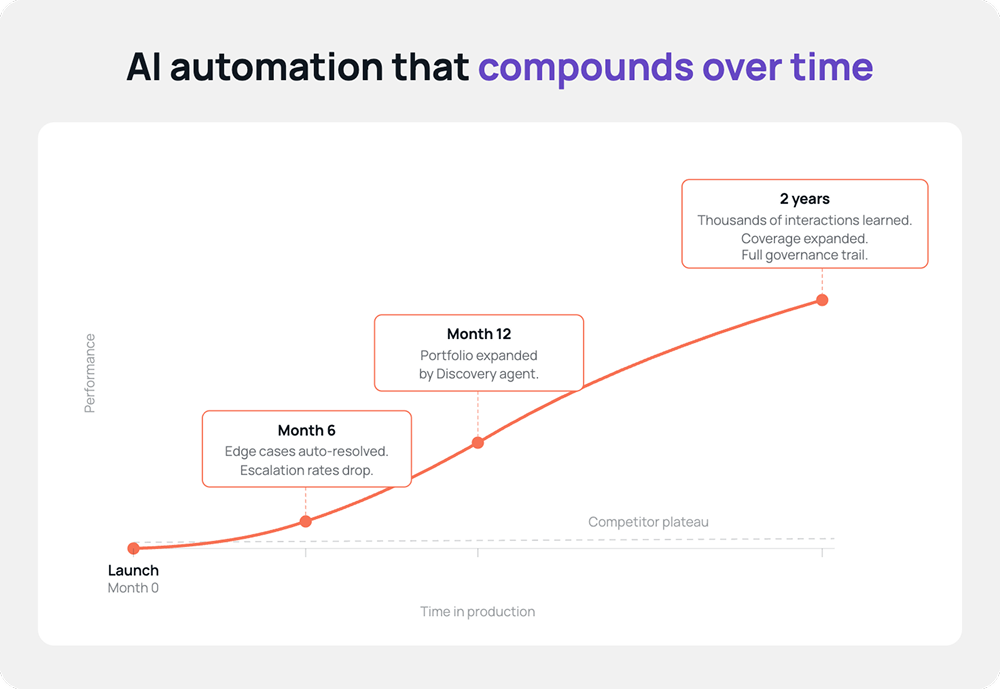
The value of this architecture isn't visible in month one. It's visible in month six, month twelve, and beyond, when competitors' deployments have plateaued and yours is still improving.
Six months in: your workflows handle edge cases they couldn't handle at launch. Escalation rates have dropped. Not because engineers reviewed transcripts, but because the system identified failure patterns and fixed them. Compliance teams can point to structural enforcement evidence, not just testing logs.
Twelve months in: your automation portfolio has expanded not because you ran a discovery exercise, but because Discovery Agent surfaced new opportunities continuously. Each new workflow entered the same cycle: identify, build, validate, optimize, learn.
Two years in: you have an automation environment that has learned from tens of thousands of conversations, optimized hundreds of workflow steps, and expanded its coverage faster than any team could have done manually, with complete governance visibility at every step.
The system has compounded. Not because of any single AI agent, but because of how all five work together.
Why this requires a native architecture, not a tool stack
The flywheel effect is not just a feature of having five AIagents. It depends on a specific architectural reality: all five agents share the same context, coordinated by Orchestration at the core of the CXP.
Insights Agent can trigger a Discovery cycle because it reads the same interaction data Discovery Agent analyzes. Optimization Agent can make precise improvements because Developer Agent built workflows as structured graphs of isolated states, not monolithic prompts where every change affects everything. Simulation Agent can verify Optimization Agent's changes because both operate on the same workflow representation.
This is the difference between AI agents that coexist on a platform and AI agents that are architecturally designed to amplify each other. Bolting together best-of-breed point solutions doesn't produce a flywheel: it produces integration overhead and fragmented context. The ASAPP CXP is AI-native from the ground up, built around the premise that the most powerful automation system isn't the one with the best individual components. It's the one where every component makes every other component better.
What this means for CX leaders
The question that used to define success in enterprise AI was: can we deploy it? That question has largely been answered. Most enterprises can deploy AI-driven automation. The differentiating question now is: can we deploy AI that gets better?
The answer requires more than a powerful language model. It requires an architecture where each component amplifies the others—where deployment produces the data and structure that make optimization possible, where optimization produces insights that feed the next deployment decision, where every customer interaction makes the system more capable for the next customer.
That architecture is the ASAPP CXP flywheel.
The enterprises that will lead in AI-driven customer experience over the next five years won't just be the ones that deployed first. They'll be the ones whose systems compounded fastest, turning each customer interaction into a signal for improvement, each improvement into better automation, and each better automation into better outcomes for the customers who follow.
See how the ASAPP CXP flywheel works in your operation. Talk to an AI CX specialist →